

Most business owners I talk to can tell me revenue. Pretty quickly, too.
They can usually tell me what the bank balance is (or at least what they hope it is). They can tell me payroll is expensive. They can tell me ads are up. They can tell me things feel tight.
But if I ask, “What’s your margin by service line?” or “Which jobs are actually making you money?” the room gets quiet.
And it’s not because you’re doing something wrong. It’s because most bookkeeping setups are built to file taxes, not to answer real operational questions on a Tuesday morning when you have to make a decision.
So let’s fix that.
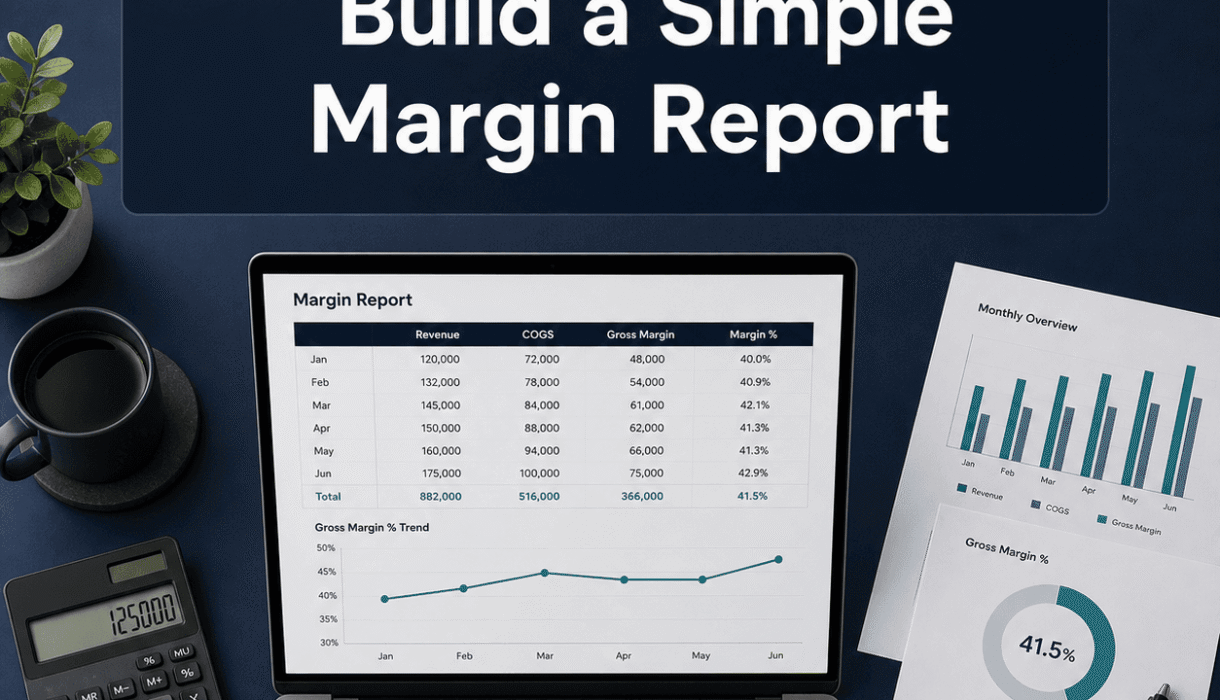
This is about building a simple margin report you can look at every month and actually trust. One that stops the guessing. One that makes pricing decisions easier. Hiring decisions easier. Even marketing decisions easier.
You do not need a complicated dashboard. You do not need to be a CFO. You just need clean inputs and a basic structure that stays the same every month.

The real problem: profit is not a feeling
A lot of people use “profit” as shorthand for “cash left in the bank.”
Sometimes those are similar. Often they’re not.
You can have cash and still be unprofitable (deposits, loans, slow bills, not paying sales tax yet, you name it). And you can have profit on paper and still feel broke (inventory, debt payments, big vendor bills landing at the wrong time).
A margin report doesn’t solve every cash flow issue. But it does solve the core question underneath a lot of stress:
Are we making money on what we sell?
Not “are we busy.” Not “did we have a good month.” Not “did revenue go up.”
Actual margin.
What a margin report is (and what it isn’t)
A simple margin report is basically:
Revenue minus direct costs equals gross profit.
Gross profit divided by revenue equals gross margin percent.
That’s it. That’s the heartbeat.
Then, below that, you list operating expenses (overhead) to land at net profit. But the magic is gross margin, because gross margin tells you whether the thing you sell is healthy before overhead even shows up.
A margin report is not:
- a 40 tab spreadsheet
- a budget vs actual report with 200 lines
- a mystery chart you look at once a year
It’s a small set of numbers you can compare month to month. And ideally, by product, service, location, crew, or project type. Whatever matters in your business.
Start here: pick the level you want to measure
This is where people get stuck. They want the “perfect” breakdown. They want to track everything. Then nothing gets tracked.
Pick one level that actually helps you make decisions.
Here are a few good options:
- By service line (Landscaping vs irrigation vs hardscapes)
- By product category (Retail store: apparel vs accessories vs custom orders)
- By project type (Remodels vs new builds vs service calls)
- By customer type (Commercial vs residential)
- By location (Location A vs Location B)
Don’t pick five. Pick one.
You can add more later, once the first one is solid.
Step 1: make sure your books are clean enough to trust
This part is not glamorous. But it’s the foundation.
If your bank accounts are not reconciled, if transactions are sitting in “Ask My Accountant,” if payroll is coded all over the place, your margin report will be a very confident lie.
So before you build anything, do a quick check:
- Bank and credit cards reconciled through month end
- Undeposited funds is not a junk drawer
- Loan payments split correctly (principal vs interest)
- Payroll mapped consistently
- Owner draws not mixed into expenses
- Sales tax not hiding inside “Supplies” (it happens)
If you’re not sure, this is exactly the kind of thing a QuickBooks health check is meant to catch. Smart Bookkeeping Partner offers a free one, and it’s basically a “here’s what’s clean, here’s what’s messy, here’s what will break your reporting” walkthrough. Worth doing before you build reports you plan to use.
Link for later: https://smartbookkeepingpartner.com/

Step 2: decide what counts as “direct cost” in your business
This is the make or break step.
Gross margin only works if your direct costs are classified consistently. Otherwise, you’ll compare months and think something changed, but really you just coded labor differently.
A simple definition:
Direct costs are costs that go up and down with revenue.
If you sell nothing this month, direct costs should be close to zero.
Examples that are usually direct costs:
- Materials used on jobs
- Subcontractors
- Merchant processing fees (sometimes treated as direct, sometimes overhead, pick one)
- Job specific freight and delivery
- Direct labor (often, but depends on your model)
- Job permits tied to the work
Examples that are usually overhead:
- Office rent
- Admin payroll
- Software subscriptions
- Insurance (general business policies)
- Marketing
- Owner salary (depends, but be consistent)
Two notes because life is messy:
- Labor is the tricky one. If you have field crews who only work billable jobs, that is direct labor. If you have a salaried project manager doing a mix of billable and non billable work, you might split it or keep it in overhead. The key is consistency.
- Vehicles and equipment can go either way. If you want a pure job margin, you may allocate them. If you want a simpler first report, keep them in overhead. You can level up later.
Step 3: create your chart of accounts so margin is obvious
In QuickBooks (and most accounting systems), the Profit and Loss report is only as good as your account structure.
To make margin easy, your chart of accounts should clearly separate:
- Income
- Cost of Goods Sold (COGS) or Cost of Services (direct costs)
- Operating Expenses (overhead)
So you want something like:
Income
- Service Income: Landscaping
- Service Income: Irrigation
- Service Income: Hardscapes
Cost of Services
- Materials: Landscaping
- Labor: Landscaping
- Subcontractors: Landscaping
- Materials: Irrigation
- Labor: Irrigation
- etc
Operating Expenses
- Advertising
- Office Supplies
- Insurance
- Rent
- Software
- etc
If your income accounts are broken out but your costs are lumped into one bucket called “Materials,” your margin by service will be useless. You need both sides to match at least at the same level.
Not a hundred accounts. Just enough to answer the question you picked earlier.
Step 4: pick the simplest tracking method (do not overcomplicate this)
There are two clean ways to do margin reporting inside QuickBooks:
Option A: Margin by account structure (simpler to maintain)
This is what we just described. Revenue and direct costs have matching accounts.
Pros: clean, straightforward
Cons: can get account heavy if you have many services
Option B: Margin by class or location (more flexible)
You keep accounts more general, and use Classes (or Locations) to tag income and costs.
Pros: scalable, good for service lines
Cons: requires disciplined tagging on every transaction
If your team will not tag classes consistently, do not choose this. You will be mad every month.
A lot of businesses do a hybrid: basic account structure plus classes for the biggest split. That’s fine. But start simple.
Step 5: Build the Margin Report (The Actual Layout)
You can do this in three places:
- QuickBooks Profit and Loss (customized)
- Excel or Google Sheets (pulled from QuickBooks)
- A reporting tool (later, once your data is stable)
For a first pass, I like using QuickBooks itself. Less moving parts. Less “version confusion.”
Here’s the simplest margin report format:
Simple Monthly Margin Report
Revenue
- Total Revenue
Direct Costs
- Materials
- Subcontractors
- Direct Labor
- Other Direct Costs
Gross Profit (Revenue minus Direct Costs)
Gross Margin % (Gross Profit divided by Revenue)
Overhead
- Payroll Admin
- Rent
- Insurance
- Marketing
- Software
- Other Overhead
Net Profit
Net Margin %
That’s the whole thing.
Then, if you’re doing service line tracking, you run it by class or by income account group.

The Part Nobody Wants to Hear: You Must Review It Every Month
A margin report you don’t look at is just paperwork.
Put a recurring meeting on your calendar. Even if it’s just you.
Monthly rhythm that works:
- Close the books (reconcile, review coding)
- Run the margin report
- Compare to last month and same month last year
- Write down 3 notes: what improved, what got worse, and the one thing you will change
That’s how it becomes a management tool, not just a report.
To enhance your reporting capabilities, consider utilizing QuickBooks Performance Centre, which offers advanced features to help analyze your business performance more effectively.
Common margin report mistakes (so you can avoid them)
1. Mixing owner draws with expenses
Owner draws are not an expense. If they’re in expenses, net profit looks smaller than reality and trends become meaningless.
2. Treating loan principal as an expense
Only interest is an expense. Principal is a balance sheet payment.
3. Recording deposits as income when they’re not earned
If you take deposits, retainers, or prepayments, those might be liabilities until earned, depending on your method and industry. At minimum, you want consistency so revenue timing doesn’t swing your margin randomly.
4. No separation between direct labor and admin labor
If your field labor is sitting in “Payroll Expenses” with your office manager, your gross margin will be distorted. This is one of the biggest ones I see.
5. Looking at gross margin without checking pricing
When margin dips, people blame costs first. Sometimes it’s pricing. Or discounting. Or scope creep. The report is the smoke alarm. You still have to find the fire.
A quick example (numbers, but not scary)
Let’s say you did $100,000 in revenue.
Direct costs:
- Materials: $25,000
- Subcontractors: $10,000
- Direct labor: $30,000
Total direct costs: $65,000
Gross profit: $35,000
Gross margin: 35%
Then overhead is $28,000.
Net profit: $7,000
Net margin: 7%
Now you can actually talk about something real.
If your target gross margin is 45% and you’re at 35%, you do not have an overhead problem. You have a job margin problem. That’s pricing, labor efficiency, material waste, estimating, or project management.
And if gross margin is strong but net profit is weak, now you know it’s overhead or volume or both.
That’s why this report matters.
How to make it “decision ready” (the extra 10% that helps a lot)
Once you have the basics, add two small upgrades.
Upgrade 1: show dollars and percent on the same report
Dollars tell you scale. Percent tells you efficiency. You need both.
Upgrade 2: add a simple target column
Put your target gross margin right next to actual.
Example:
- Actual gross margin: 35%
- Target gross margin: 45%
Now it’s not just information. It’s a scoreboard.
If you want, keep it brutally simple with a 1 page template
Here’s a one page structure you can copy into a Google Sheet today. No fancy formulas beyond basic math.
Month: _______
Revenue: _______
Direct Costs
- Materials: _______
- Subcontractors: _______
- Direct labor: _______
- Other direct: _______
Total Direct Costs: _______
Gross Profit: _______
Gross Margin %: _______
Overhead
- Admin payroll: _______
- Rent: _______
- Insurance: _______
- Marketing: _______
- Software: _______
- Other: _______
Total Overhead: _______
Net Profit: _______
Net Margin %: _______
Then add a small notes section:
Notes (3 bullets):
That’s a margin report you will actually use.
Where Smart Bookkeeping Partner fits in (if you want help)
If you read all this and thought, “Okay, but my QuickBooks is not set up like that,” you’re not alone. Most aren’t.
This is the kind of work Smart Bookkeeping Partner does every day: clean, reconciled books first, then reporting that helps you run the business. Margin reports, KPI tracking, cash flow monitoring, forecasting. The stuff that turns bookkeeping into decision support.
If you want a no pressure starting point, do the free QuickBooks health check and get a clear picture of what’s currently working, what’s not, and what needs cleanup before margin reporting will be accurate.
You can start here: https://smartbookkeepingpartner.com/
Or call: 985-401-1210

Wrap up (the point of all this)
Stop guessing profit based on how busy you are or how much is in the bank this week.
Build a simple margin report. Keep it consistent. Look at it monthly. Make one change at a time based on what it’s telling you.
Because once you can see margin clearly, a bunch of decisions get easier. Pricing. Hiring. Which services to push. Which jobs to say no to. Whether growth is actually helping or just creating more chaos.
And honestly. It feels calmer. Not perfect, but calmer. You’re not operating on vibes anymore.
You’re operating on numbers you can trust.
FAQs (Frequently Asked Questions)
Why do most business owners struggle to know their margin by service line or which jobs are profitable?
Most bookkeeping setups are designed primarily for tax filing, not for providing real-time operational insights. This means that while owners can quickly tell revenue or bank balances, they often lack clear, trustworthy margin reports to understand profitability by service line or job.
What is a margin report and why is it important for my business?
A margin report shows revenue minus direct costs to calculate gross profit and gross margin percentage. It helps you understand if what you sell is actually making money before considering overhead expenses. This report stops guessing and makes pricing, hiring, and marketing decisions easier.
How does profit differ from cash in the bank?
Profit refers to the actual earnings after subtracting costs, whereas cash in the bank is just the available money at a moment. You can have cash but still be unprofitable due to things like loans or slow-paying invoices, and vice versa. A margin report focuses on true profitability rather than just cash flow.
What level of detail should I choose when building a margin report?
Start simple by picking one level of measurement that aids decision-making—such as by service line, product category, project type, customer type, or location. Avoid tracking too many levels at once to prevent confusion; you can add more detail later once your initial setup is solid.
What steps should I take to ensure my bookkeeping data is reliable for margin reporting?
Before building reports, ensure your books are clean: reconcile bank and credit card accounts through month end; avoid undeposited funds as a junk drawer; correctly split loan payments; consistently map payroll; separate owner draws from expenses; and keep sales tax out of supply accounts. A QuickBooks health check can help identify issues.
How do I decide what counts as direct costs in my business for accurate gross margin calculation?
Direct costs are those that increase or decrease directly with revenue—like materials used on jobs, subcontractors, merchant fees, job-specific freight, and often direct labor related to billable work. Overhead includes items like office rent, admin payroll, software subscriptions, insurance, marketing, and owner salary. Consistency in classification is key for meaningful comparisons.